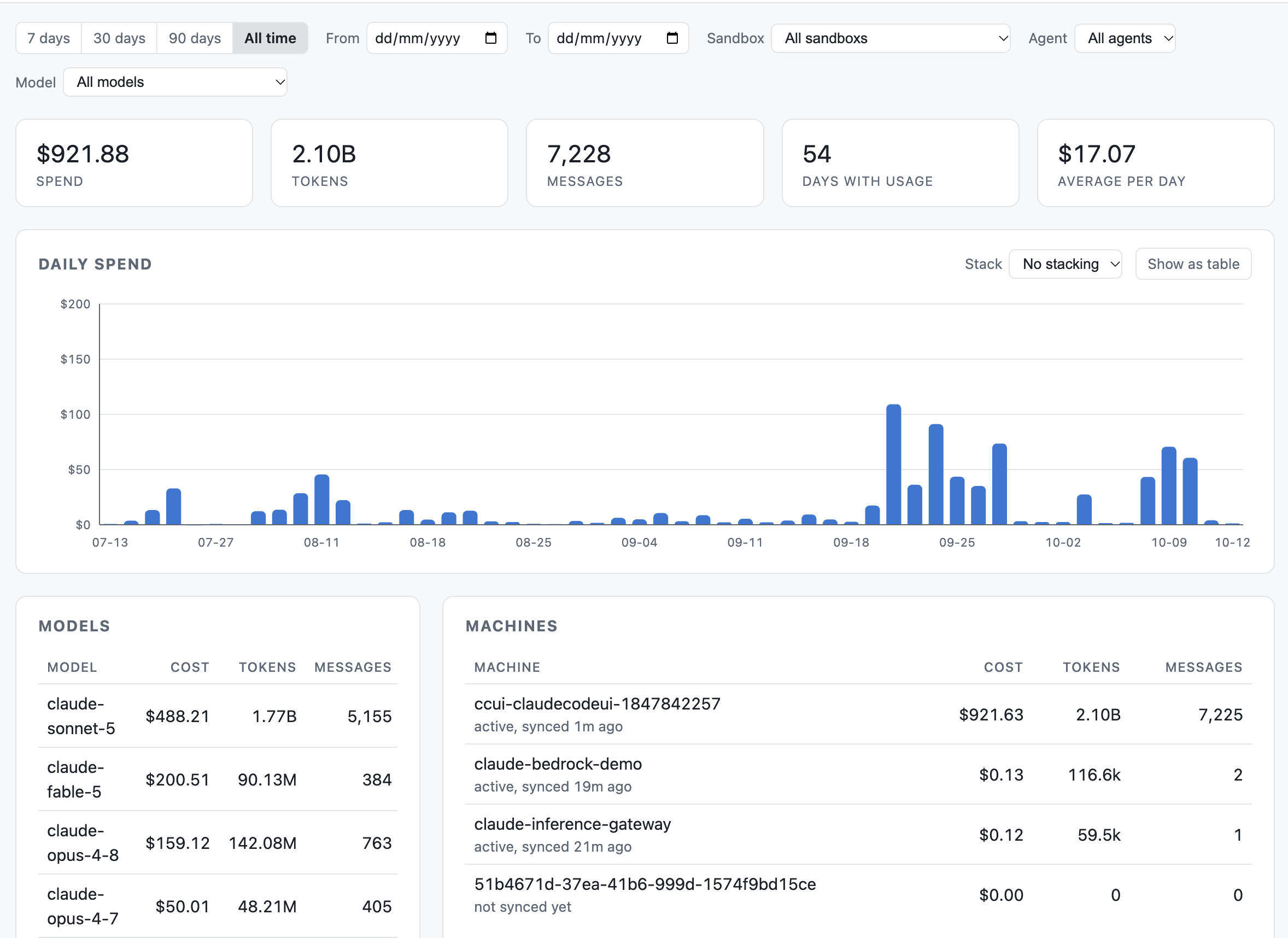
I run coding agents inside disposable Docker Sandboxes (sbx) to keep my system safely isolated from agents that I run. Getting a view of token usage across all agents I run, in all sandboxes, is not easy. Every agent writes its own session logs inside the sandbox. When you spin up half a dozen sandboxes across different projects and destroy them after work finishes, token counts and spend metrics will therefore disappear along with the sandboxes. To solve this, I put together krisfoster/ccusage-sbx, an experimental Docker Sandbox kit and host hub that syncs token consumption from ephemeral sandboxes into a centralised dashboard on your local machine.
It provides a dashboard that gives a consolidated view of token consumption across every sandbox. You can stack the daily spend chart by sandbox name, agent type, or model, filter by custom date windows, and inspect per-machine and per-model costs without leaving your browser. It’s very much a PoC, so expect sharp edges.
A Proof of Concept, Not a Product
To be clear: this project is a proof of concept. It is an investigation into how far you can push Docker Sandbox mixin kits, local process supervision, and agent lifecycle hooks to solve visibility problems in disposable environments.
It is not an enterprise monitoring suite. It is an exploration of mechanics: how to move metrics out of guest containers safely, how to keep secrets out of untrusted environments, and how to preserve usage history after containers are destroyed. The code works on my machine, passes end-to-end tests across concurrent sandboxes, and shows what is possible when pairing disposable microVMs with lightweight local collectors.
Building on the ccusage Fork
A few weeks ago, I worked on krisfoster/ccusage during a hackathon to add multi-machine aggregation via Google Cloud Storage and static HTML reporting. Upstream ccusage is an excellent CLI tool by ryoppippi that inspects local log directories for Claude Code, Codex, Gemini CLI, and other agents.
That earlier fork relied on object storage buckets. Cloud storage made sense for synchronising separate physical laptops, but requiring a cloud bucket and cloud credentials for containers running on the same local machine felt unnecessary.
For sandbox workflows, I extended the fork with a local HTTP sync provider. Instead of speaking to cloud APIs, the binary can run in two modes:
- Server mode (
ccusage sync serve): Listens on local loopback, accepts authenticated usage updates from sandboxes, merges records, and serves the web dashboard. - Client mode (
ccusage sync run): Reads local transcript logs inside the guest container, calculates token sums using embedded pricing tables, and uploads aggregate shards to the host via HTTP.
This architecture keeps every byte on your physical computer. No credentials leave the machine, and no third-party cloud services are required.
System Architecture
The setup consists of two halves: a background hub process on the host machine, and a reusable mixin kit injected into each Docker Sandbox.
flowchart TB
    subgraph Guest["Sandbox Guest MicroVM (one per active sbx instance)"]
        direction TB
        Agent["Coding Agent (Claude Code / Codex / Gemini CLI / Copilot)<br/>Writes transcripts and session logs to ~/.claude, ~/.codex, etc."]
        Hooks["Agent Lifecycle Hooks<br/>(runs sync-now.sh)"]
        Loop["Background Sync Loop (sync-loop.sh)<br/>Interval timer + queue"]
        Binary["ccusage (static binary)<br/>Reads local logs, parses token usage"]

        Agent -->|"turn completion / session exit"| Hooks
        Hooks -->|"triggers"| Loop
        Loop -->|"executes"| Binary
    end

    subgraph Proxy["Docker Sandbox Gateway (sbx proxy)"]
        direction TB
        Gateway["Intercepts outbound calls to host.docker.internal:8777<br/>Substitutes placeholder token with secret from host storage"]
    end

    subgraph Host["Host Machine (macOS / Linux)"]
        direction TB
        Hub["ccusage-sbx-hub<br/>(Local daemon)"]
        Data[("~/.ccusage-sbx/data")]
        Dashboard["Browser Dashboard<br/>(Stack by sandbox, agent, model, date)"]

        Hub -->|"writes"| Data
        Hub -->|"HTTP (127.0.0.1:8787)"| Dashboard
    end

    Binary -->|"HTTP POST with placeholder<br/>(host.docker.internal:8777)"| Gateway
    Gateway -->|"HTTP POST with real secret<br/>(127.0.0.1:8777)"| Hub
1. The Guest Kit (ccusage-kit)
Docker Sandbox supports mixin kits: declarative configuration overlays that package binaries, environment variables, network firewall rules, and startup scripts.
When sbx create launches a container with the kit, install.sh downloads a pre-compiled, static ccusage binary pinned to a known Git commit. To keep the container secure, install.sh verifies the binary against a committed SHA256SUMS file before marking it executable.
Once verified, a background supervisor script (sync-loop.sh) starts. It joins the host hub, schedules sync runs, and manages transient connection failures with exponential backoff and jitter.
2. Capturing Turns with Agent Lifecycle Hooks
Relying entirely on a periodic timer causes two operational problems:
- Latency: Usage data lags behind actual agent activity by several minutes.
- Data loss on shutdown: If you complete a task and run
sbx stoporsbx rm, the final session turn never syncs.
To prevent this, the kit configures native lifecycle hooks for supported agents during container initialisation:
- Claude Code: Registers
StopandSessionEndhooks directly into~/.claude/settings.json. - Codex: Sets the
notifyconfiguration setting in~/.codex/config.toml. - Gemini CLI: Merges
AfterAgentandSessionEndhooks into~/.gemini/settings.json. - GitHub Copilot CLI: Adds a custom hook definition at
~/.copilot/hooks/ccusage-sync.json.
These hooks invoke a lightweight helper script (sync-now.sh). The script signals the background sync loop to perform an immediate flush and returns control to the agent instantly. Because coding assistants execute hooks synchronously and terminate commands that block, keeping sync-now.sh non-blocking is essential.
3. Keeping Secrets Out of the Guest Environment
The sandbox guest must authenticate against the host hub, but hardcoding an API token inside the container defeats the security boundary of using microVMs. If an agent executes untrusted code from an external repository, that code could inspect environment variables or read configuration files.
To prevent token exposure, the system uses Docker Sandbox proxy substitution:
- The host installer generates a random authentication token and stores it at
~/.config/ccusage-sbx/hub-token, with file permissions restricted to the current user (chmod 600). - The installer registers the secret with Docker Sandbox via
sbx secret set-custom. - The guest container environment receives only a placeholder string:
CCUSAGE_SYNC_TOKEN=ccusage-hub-token. - When the guest container sends an HTTP request to
host.docker.internal:8777, the host-sidesbxproxy intercepts the connection, removes the placeholder header, and inserts the authentic token.
The guest container never sees the real secret. Even if a script dumps the container environment, it discovers only the dummy placeholder.
4. The Host Hub Service
On the host, ccusage-sbx-hub manages background operations. It runs as a user-level service (launchd on macOS, or a systemd user service on Linux).
The hub performs several tasks:
- Ingestion: Accepts signed sync payloads from guest sandboxes and writes daily JSON shards to
~/.ccusage-sbx/data/. - Deduplication: Suppresses overlapping log windows to prevent double-counting when transcripts are re-scanned.
- Dashboard host: Serves the single-page web interface over
127.0.0.1:8787. - Maintenance: Exposes management commands such as
status,machines,flush, andrepairto rebuild totals from raw records.
Aggregation Mechanics
Managing metrics from disposable environments requires accounting for container lifecycles:
- Machine Identity: Each sandbox generates a unique machine identifier. When
sbx kit addrecreates a container during configuration changes, the sandbox retains its identifier and configuration, preventing duplicate records. - Preserving Historical Data: Running
sbx rmremoves the microVM, but its usage records remain permanently in the host store. The hub marks machines as retired after 14 days without active syncs while retaining their full financial history. - Pruned Transcripts: Coding agents periodically prune older session files from disk. The hub maintains historical totals incrementally, ensuring that local log pruning never reduces previously recorded spend.
Trying It Out
Because the kit loads directly from Git, you can test it without compiling Rust binaries locally.
First, permit sbx to load kits from the repository:
sbx settings set kit.allowedSources '["docker.io/","github.com/docker/","github.com/krisfoster/"]'
Clone the repository and install the host hub:
git clone https://github.com/krisfoster/ccusage-sbx.git
cd ccusage-sbx
scripts/install-host-binary.sh
host/ccusage-sbx-hub install
Launch a new sandbox with the mixin kit attached:
sbx create claude . --kit "git+https://github.com/krisfoster/ccusage-sbx.git#dir=ccusage-kit"
Once the agent runs a turn, open the dashboard to inspect the metrics:
host/ccusage-sbx-hub dashboard --open
Wrapping Up
This project shows what can be done with token tracking across sandboxes. It feels like this is a useful tool and something more could be done to track usage that doesn’t rely on using an inference gateway. Hope you find this useful.
You can find the repository at: krisfoster/ccusage-sbx.