This week I went to the Devin Mixin / Hackathon event hosted at the Cloudflare offices in London. We were gifted a chunk of credits to use with Devin during the hackathon, and I decided to fork and add some features I wanted to krisfoster/ccusage. ccusage is an open-source CLI for tracking token consumption and cost across coding assistants and I find it super useful.
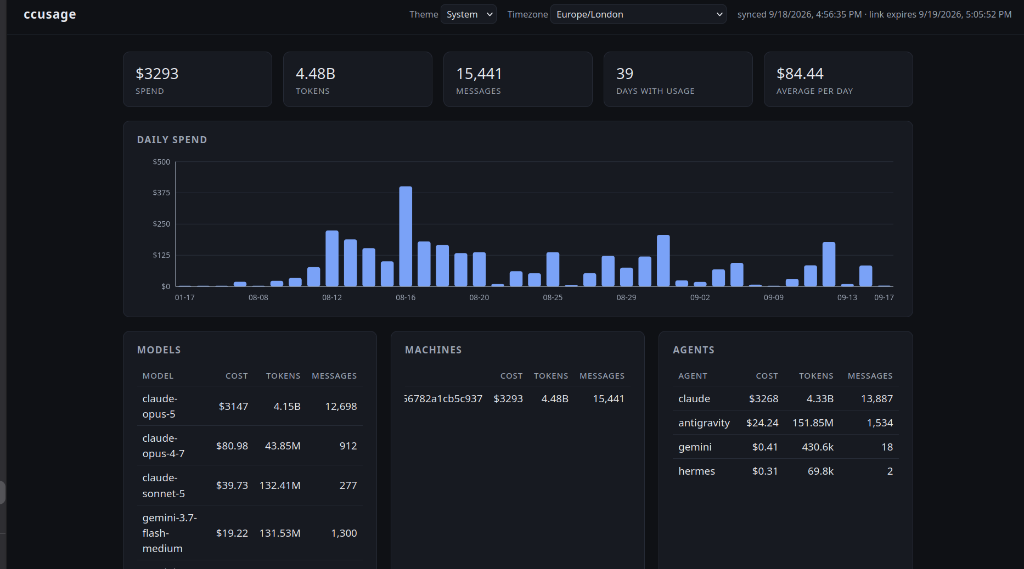
I wanted to add two features that I felt were missing. First, aggregating token logs across separate development machines (into Google Cloud Storage - GCS), and secondly generating a nice HTML dashboard to show my aggregate profligate spend. Oh, and I want the dashboard to show me how much I could have saved by switching LLM provider.
Note: I have a Claude Pro sub, I don’t really spend that much on AI! ccusage uses my tokens and gives me a token-based cost.
The Goal: Cross-Machine Aggregation and Visual Reports
ccusage reads local session logs from agent data directories on your filesystem, meaning that when you work across multiple laptops, or remote development boxes, usage metrics remain isolated on each machine. And it is CLI first for reports. So my plan, in detail, was to add:
- Cloud storage sync: Syncing raw JSON logs from each workstation to a centralized Google Cloud Storage bucket.
- Dashboard generation and sharing: Generating a standalone HTML dashboard directly from synced cloud data, complete with shareable signed URLs.
Building Asynchronously with Devin
I pointed Devin at the forked repository and started planning how to build. And although my project took longer than I had in the hackathon, I ended up being pretty happy with the result.
The most noticeable difference when working with a cloud-hosted agent is detachment from the local process. Local coding assistants require an active terminal session, keeping the IDE open and supervising command execution directly. Because Devin runs entirely in its own remote sandbox, I submitted prompt batches, closed the laptop lid, and let the agent work while chatting with other attendees at the event.
So, what did Devin and I build?
1. Bucket Synchronization
A backend sync command to upload and reconcile local usage records with a configured Google Cloud Storage bucket:
ccusage sync setup # Sets up cloud storage, you do need a Google Cloud account.
ccusage sync run   # Run the sync
2. Shareable Signed URLs
To share dashboards securely without opening public bucket permissions, Devin added automated URL signing:
ccusage sync share
The generated links provide time-bounded read access directly to the static dashboard asset in GCS.
3. Dashboard Deployment
To view aggregate statistics across machines and models, Devin generated a static single-page report containing spend summaries, token totals, and daily cost breakdowns:
ccusage sync dashboard --deploy --open
Get the Code
You can find the code on GitHub: krisfoster/ccusage.